
How do I cancel my subscription?Updated 3 days ago
You can cancel anytime via your account portal, there are no lock-ins or cancellation fees.
Once you have logged in, simply click the three dots as shown below and scroll down to the cancel option: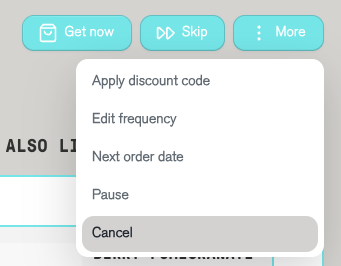
We're really sorry to see you go, so if there's anything we could be doing better, we'd love to hear your feedback. Just drop us an email to [email protected].
Please note, if your subscription just renewed, it will likely not be possible to cancel your most recent order but you are welcome to return it for a refund provided it is unused and unopened.